Label i3 Workspaces with Emojis Using a Custom PyQt6 Picker
July 3, 2026
Ten numbers scattered across three monitors is not a great data structure to organise everything you’re working on. You accidentally open something on workspace 7 instead of 8 and lose track completely. I wanted something visual: press a hotkey, pick an emoji, and the workspace becomes 8:🤖 or 4:🌍. The number stays, so Alt+4 still works, but now I can see what it’s for.
Now pressing Alt+i opens this:
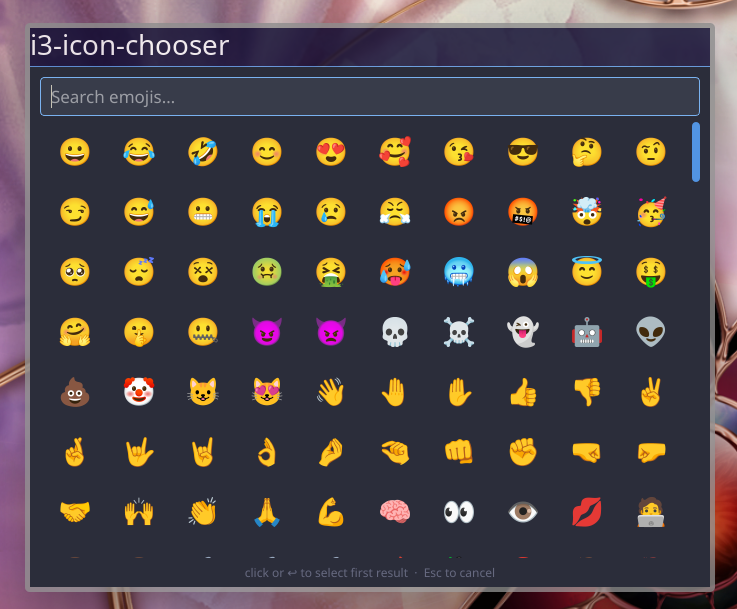
and changes my bar so I see this:

How i3 workspace naming works
i3 identifies workspaces by their name string. When a workspace is called "4" and you press Alt+4, i3 finds it with a literal string match on "4". Rename it to "4:🌍" and the binding stops working: there is no longer a workspace called "4".
The fix is workspace number 4. This tells i3 to find the workspace whose name starts with 4, so "4:🌍" still matches. The critical detail is that number has to appear literally in the config: it can't come from a variable. More on this at the end.
Prerequisites
- i3wm
- Python 3.10+
- PyQt6:
sudo pacman -S python-pyqt6on Arch i3-msg(ships with i3)~/bin/(or equivalent) on your PATH
The script
The picker is a single Python file. Create it at a stable location; mine lives at /sync/info/system/software/i3-icon-chooser/i3-icon-chooser. I'll walk through it in sections.
Imports
Nothing unusual: subprocess to talk to i3, json to parse the workspace list, and the expected PyQt6 imports.
i3-icon-chooser#!/usr/bin/env python3
import sys, json, subprocess
from PyQt6.QtWidgets import (
    QApplication, QWidget, QVBoxLayout, QLineEdit,
    QScrollArea, QGridLayout, QPushButton, QLabel, QFrame,
)
from PyQt6.QtCore import Qt, QSize, QTimer
from PyQt6.QtGui import QFont
The emoji list
EMOJIS is a flat list of (emoji, keywords) tuples. The keywords are what the search filter runs against, so "robot android ai bot" means typing any of those words surfaces 🤖.
i3-icon-chooserEMOJIS = [
    # (emoji, searchable keywords)
    ("😀", "grinning happy smile face"),
    ("🤖", "robot android ai bot"),
    ("🌍", "globe earth world africa europe"),
    # 511 more across faces, animals, food, travel,
    # activities, objects, and symbols
]
EmojiButton
A thin QPushButton subclass that stores the emoji string and pins the size to 58×58 so the grid stays even.
i3-icon-chooserclass EmojiButton(QPushButton):
    def __init__(self, emoji: str, name: str, parent=None):
        super().__init__(emoji, parent)
        self.emoji = emoji
        self.setToolTip(name.title())
        self.setFixedSize(QSize(58, 58))
        self.setFont(QFont("Noto Color Emoji", 24))
        self.setFlat(True)
        self.setCursor(Qt.CursorShape.PointingHandCursor)
Building the UI
EmojiPicker is a fixed-size QWidget containing a search field, a QScrollArea holding a QGridLayout of buttons, and a hint label at the bottom. The search field gets an event filter installed on it so the Down arrow key moves focus directly into the grid.
i3-icon-chooserclass EmojiPicker(QWidget):
    COLS = 10
    WIN_W, WIN_H = 680, 520

    def __init__(self, ws_num: int, ws_rect: dict):
        super().__init__()
        self._ws_num = ws_num
        self._ws_rect = ws_rect
        self._buttons: list[EmojiButton] = []
        self._setup_ui()
        self._populate(EMOJIS)
        self._position()

    def _setup_ui(self):
        self.setWindowTitle("i3-icon-chooser")
        self.setFixedSize(self.WIN_W, self.WIN_H)
        layout = QVBoxLayout(self)
        # search field
        self._search = QLineEdit()
        self._search.setPlaceholderText("Search emojis…")
        self._search.textChanged.connect(self._filter)
        self._search.installEventFilter(self)
        layout.addWidget(self._search)
        # scrollable emoji grid
        scroll = QScrollArea()
        scroll.setWidgetResizable(True)
        scroll.setFrameShape(QFrame.Shape.NoFrame)
        self._grid_widget = QWidget()
        self._grid = QGridLayout(self._grid_widget)
        scroll.setWidget(self._grid_widget)
        layout.addWidget(scroll)
        self._scroll = scroll
        # hint
        hint = QLabel("click or ↩ to select first result  ·  Esc to cancel")
        hint.setAlignment(Qt.AlignmentFlag.AlignCenter)
        layout.addWidget(hint)
Filtering in real time
_populate tears down the grid and rebuilds it from a given list. _filter runs on every keystroke, does a substring match against the keywords, and passes the result to _populate.
i3-icon-chooserdef _populate(self, emojis: list):
    while self._grid.count():
        item = self._grid.takeAt(0)
        if item.widget():
            item.widget().deleteLater()
    self._buttons = []
    for i, (emoji, name) in enumerate(emojis):
        btn = EmojiButton(emoji, name)
        btn.clicked.connect(lambda _checked, e=emoji: self._select(e))
        self._grid.addWidget(btn, i // self.COLS, i % self.COLS)
        self._buttons.append(btn)

def _filter(self, text: str):
    q = text.strip().lower()
    filtered = [(e, n) for e, n in EMOJIS if not q or q in n] if q else EMOJIS
    self._populate(filtered)
    if filtered:
        self._scroll.verticalScrollBar().setValue(0)
The filter is a linear scan over 514 entries with no index; it's fast enough that the delay is imperceptible.
_populate and _filter on GitHub
Selecting an emoji and positioning the window
_select builds the new workspace name from the stored integer and fires the i3 rename command. Because the name is always "{num}:{emoji}", picking a second emoji replaces the first correctly: 8:🐛 becomes 8:🤖, never 8:🐛:🤖.
_position finds the Qt screen that contains the workspace rect reported by i3, then centres the window on that screen. Multi-monitor setups work correctly with no extra configuration.
i3-icon-chooserdef _select(self, emoji: str):
    new_name = f"{self._ws_num}:{emoji}"
    subprocess.run(["i3-msg", f'rename workspace to "{new_name}"'],
                   capture_output=True)
    self.close()

def _position(self):
    wx, wy = self._ws_rect["x"] + 10, self._ws_rect["y"] + 10
    screen = next(
        (s for s in QApplication.screens()
         if s.geometry().contains(wx, wy)),
        QApplication.primaryScreen()
    )
    g = screen.geometry()
    self.move(g.x() + (g.width() - self.WIN_W) // 2,
              g.y() + (g.height() - self.WIN_H) // 2)
_select and _position on GitHub
Keyboard handling
keyPressEvent handles Escape, Enter (select the first visible result), and Down arrow (move focus into the grid). The event filter on the search field covers Down arrow separately, since QLineEdit consumes key events before the parent widget sees them.
i3-icon-chooserdef keyPressEvent(self, event):
    key = event.key()
    if key == Qt.Key.Key_Escape:
        self.close()
    elif key in (Qt.Key.Key_Return, Qt.Key.Key_Enter):
        if self._buttons:
            self._select(self._buttons[0].emoji)
    elif key == Qt.Key.Key_Down and self._search.hasFocus() and self._buttons:
        self._buttons[0].setFocus()
    else:
        super().keyPressEvent(event)

def eventFilter(self, obj, event):
    from PyQt6.QtCore import QEvent
    if obj is self._search and event.type() == QEvent.Type.KeyPress:
        if event.key() == Qt.Key.Key_Down and self._buttons:
            self._buttons[0].setFocus()
            return True
    return super().eventFilter(obj, event)
keyPressEvent and eventFilter on GitHub
Entry point
get_focused_workspace calls i3-msg -t get_workspaces and returns the entry where focused is true. The "num" field is the integer i3 extracts from the leading digits of the workspace name; that's what gets stored and prepended to the emoji.
i3-icon-chooserdef get_focused_workspace() -> dict:
    result = subprocess.run(
        ["i3-msg", "-t", "get_workspaces"],
        capture_output=True, text=True, check=True,
    )
    return next(w for w in json.loads(result.stdout) if w["focused"])

def main():
    app = QApplication(sys.argv)
    app.setApplicationName("i3-icon-chooser")
    # ... dark stylesheet matching i3's colour scheme ...
    ws = get_focused_workspace()
    picker = EmojiPicker(ws_num=ws["num"], ws_rect=ws["rect"])
    picker.show()
    picker.raise_()
    picker.activateWindow()
    QTimer.singleShot(0, picker._search.setFocus)
    sys.exit(app.exec())
The QTimer.singleShot(0, ...) defers the focus call until after the event loop starts, so the search field is reliably focused when the window appears.
get_focused_workspace and main on GitHub
Install it
The pattern: the real file lives in a versioned directory, bin/ holds a relative symlink to it, and ~/bin/ holds an absolute symlink into bin/. Adjust to match your own layout.
chmod +x /sync/info/system/software/i3-icon-chooser/i3-icon-chooser

ln -s ../software/i3-icon-chooser/i3-icon-chooser /sync/info/system/bin/i3-icon-chooser
ln -s /sync/info/system/bin/i3-icon-chooser ~/bin/i3-icon-chooser
Configure i3
Four additions to ~/.config/i3/config.
Float the window
~/.config/i3/configfor_window [title="i3-icon-chooser"] floating enable
Place this near your other for_window floating rules. i3 matches on the window title set by self.setWindowTitle("i3-icon-chooser") in the Qt app.
Bind the hotkey
~/.config/i3/configbindsym $mod+i exec --no-startup-id /sync/info/system/bin/i3-icon-chooser
Use the full path, not just i3-icon-chooser. i3's exec environment inherits PATH from the display manager session, which typically doesn't include ~/bin. The --no-startup-id flag suppresses the busy cursor while Python starts up.
Fix workspace switching
Replace every workspace $wsN binding with workspace number N written out literally, and do the same for move container to workspace and any numpad variants.
~/.config/i3/configbindcode $mod+10    workspace number 1
bindcode $mod+11    workspace number 2
# ...
bindcode $mod+19    workspace number 10

bindcode $mod+Shift+10    move container to workspace number 1
bindcode $mod+Shift+11    move container to workspace number 2
# ...
bindcode $mod+Shift+19    move container to workspace number 10
What shows in the bar
Inside the bar {} block, strip_workspace_numbers no shows the full 8:🤖; strip_workspace_numbers yes shows just 🤖.
~/.config/i3/configbar {
    strip_workspace_numbers no
}
Reload with Alt+Shift+c, then press Alt+i to try it.
Gotcha: the number keyword and variable substitution
The natural instinct when fixing workspace switching is to update the set $wsN variable definitions:
~/.config/i3/config (broken)set $ws5 "number 5"
bindcode $mod+14 workspace $ws5
# after substitution: workspace number 5
# but i3 treats the whole string as a name,
# creating a workspace called "number 5"
i3's config parser recognises number as a keyword before variable substitution happens. After $ws5 is expanded, the result is treated as a workspace name, not a keyword command. i3 helpfully creates a workspace called "number 5" and things fall apart from there. Write workspace number N directly in each line:
~/.config/i3/configbindcode $mod+14 workspace number 5
If you have 60 lines to update (digit keys, numpad, numlock+numpad, and move-container variants for all of them), a quick script saves the tedium:
fix-bindings.pyimport os

path = os.path.expanduser("~/.config/i3/config")
content = open(path).read()
for i in range(10, 0, -1):  # descending to avoid $ws1 matching inside $ws10
    content = content.replace(f"workspace $ws{i}", f"workspace number {i}")
    content = content.replace(f"workspace  $ws{i}", f"workspace number {i}")
    content = content.replace(f"move container to workspace $ws{i}", f"move container to workspace number {i}")
    content = content.replace(f"move container to workspace  $ws{i}", f"move container to workspace number {i}")
open(path, "w").write(content)
One Convenient Shortcut
I didn’t actually do anything stated in this article. Here’s what I really did:
- My website is already setup to pull my articles from sanity.io. It’s a headless CMS that allowed me to define schemas for my data, and it has an MCP server that Claude can access. (See where I’m going yet?)
- I asked Claude to create the Python script and update my i3 config for me (yes this is risky; yes it did cause problems at first)
- It messed things up at first and I had to… use the mouse 😬 while I was fixing it. Pressing Alt+4 didn’t go to workspace “4”, it went to “number 4”.
- About three iterations of testing it and describing the outcome to Claude were required before it was eventually flawless.
- I asked Claude to make the GitHub repository and write this article for me
- The article was very obviously AI-generated, so I asked it to reference previous articles for my writing style and remove em-dashes.
- I had to make my own edit at the very top manually so it wasn’t obvious right away. (Who says things like “the emojis made it glance-able”? Yikes!)
- I manually wrote this part at the end of the article. I don’t know how many people are using Claude Code to improve their i3 workflow - I imagine the intersection between radical minimalism + meticulous configuration in your DE and using Claude Code to automate customising one’s system is a very small intersection. Maybe I’m pioneering something interesting here.