Blue Chevrons That Count How Deep in ranger You Are
July 7, 2026
I live in ranger, the terminal file manager. (“live” in? Eventually I’ll get the hang of having Claude speak on my behalf like this less… the articles about the tech, not my lifestyle.) One of its best features is that you can press S from any directory to drop into a shell right there, poke around, and type exit to pop back into ranger exactly where you left it. The problem is that nothing stops you from opening ranger again inside that shell, spawning another one, and another, until you have no idea how many layers deep you are. Then you type exit once too many and land somewhere you did not expect.
So I added six lines to my ~/.bashrc that prepend a blue chevron to my prompt for every level of nesting. One chevron means I am one shell deep. Three chevrons means I should probably start typing exit.
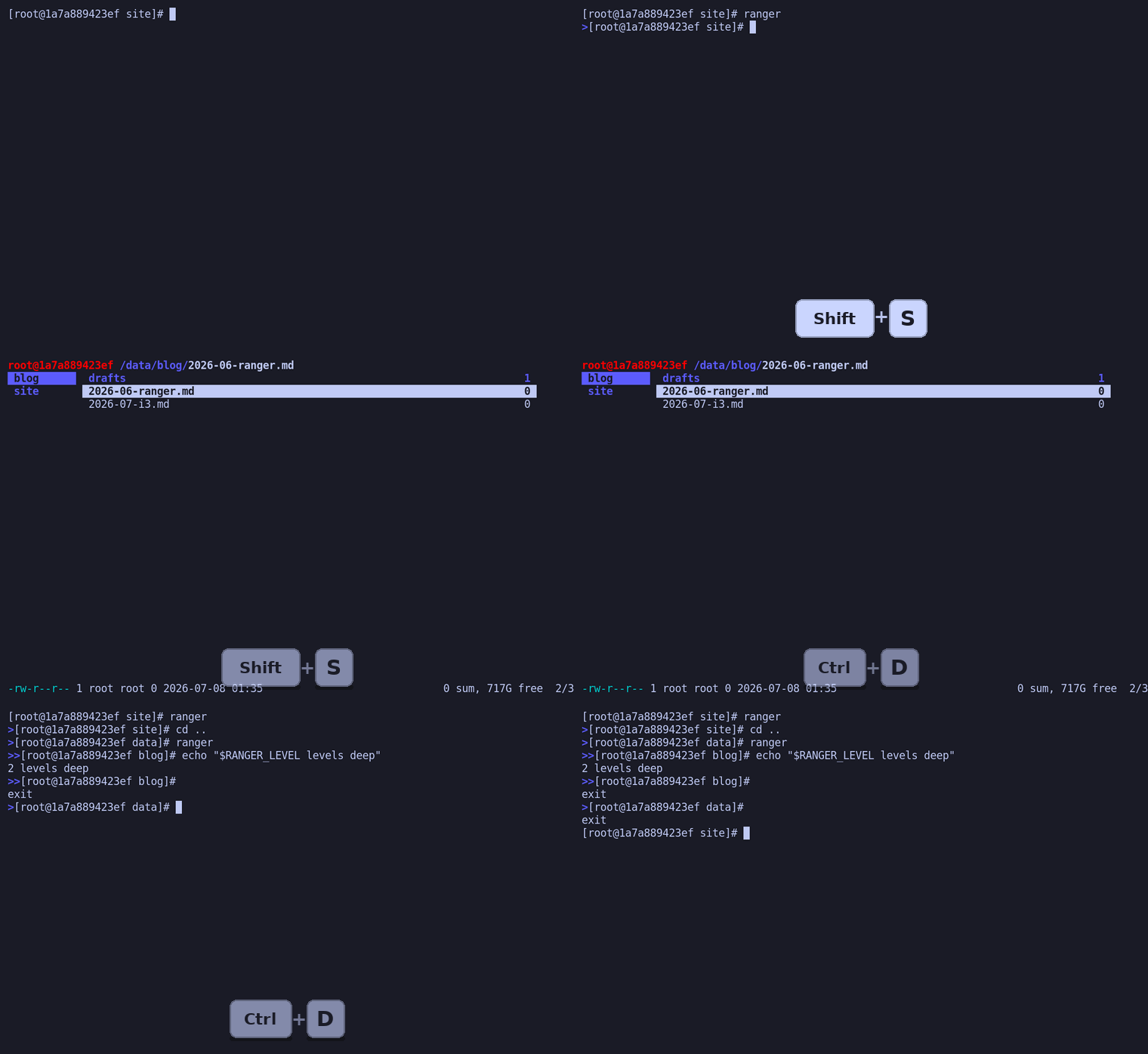
How ranger tracks depth
Every time ranger spawns a shell, it sets an environment variable called RANGER_LEVEL and increments it. The first shell gets RANGER_LEVEL=1. If you launch ranger again from that shell and press S a second time, the new shell inherits the old value and bumps it to RANGER_LEVEL=2. The variable is simply not set at all when you are in a plain terminal, so it doubles as a flag for "am I inside ranger right now."
That variable is the whole trick. All my snippet does is count it and turn the number into something my eyes can read at a glance.
The snippet
Here it is in full, straight out of ~/.bashrc:
~/.bashrcif [ -n "$RANGER_LEVEL" ]; then
    chevrons=""
    for (( i=0; i<RANGER_LEVEL; i++ )); do
        chevrons+="\[\033[1;34m\]>\[\033[0m\]"  # Adds a blue chevron for each level
    done
    export PS1="${chevrons}${PS1}"  # Prepend chevrons to the existing PS1
fi
The [ -n "$RANGER_LEVEL" ] guard means the whole block is skipped in a normal terminal, so my prompt is untouched unless I am actually inside ranger. When the variable is set, the loop runs RANGER_LEVEL times and appends one chevron per iteration to a string, which then gets glued onto the front of the existing PS1.
What is inside each chevron
Each chevron is this ugly little string:
\[\033[1;34m\]>\[\033[0m\]Breaking it down: \033[1;34m is the ANSI escape that turns text bold (1) and blue (34). The literal > is the character that actually prints. \033[0m resets the color so the rest of the prompt is not blue too.
The parts that matter most are the \[ and \] wrappers. These tell bash's line editor that everything between them is non-printing. Colors take up bytes in the string but zero columns on screen, and if you do not wrap them, bash miscounts how wide the prompt is. The visible symptom is nasty: long commands wrap onto themselves, Ctrl+R history search draws in the wrong place, and the cursor jumps around when you edit a line. Forgetting \[ \] is the single most common way colored bash prompts go wrong, so it is worth pointing at directly.
Seeing it in action
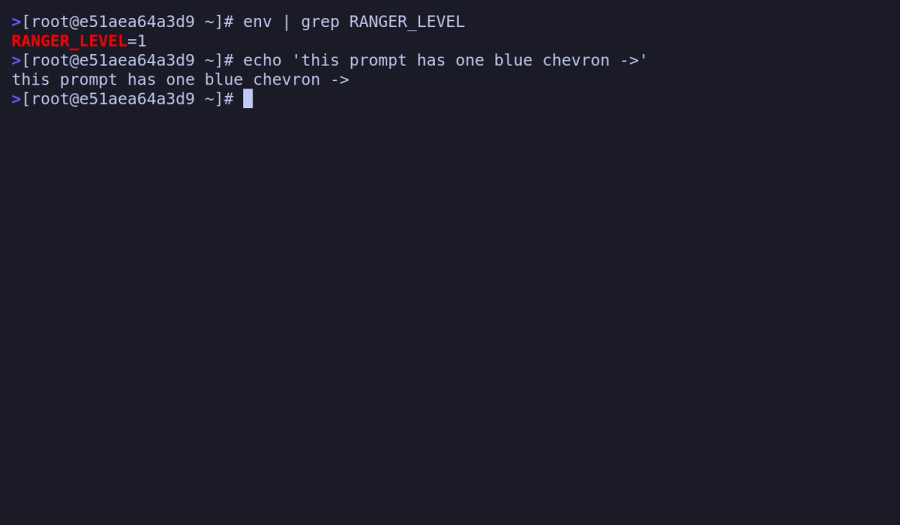
Here is a shell spawned from ranger. The prompt starts with a single blue chevron, and env | grep RANGER_LEVEL confirms why:
Now from inside that shell I open ranger again and press S a second time. The new shell reports depth 2, and the prompt grows a second chevron (>>):
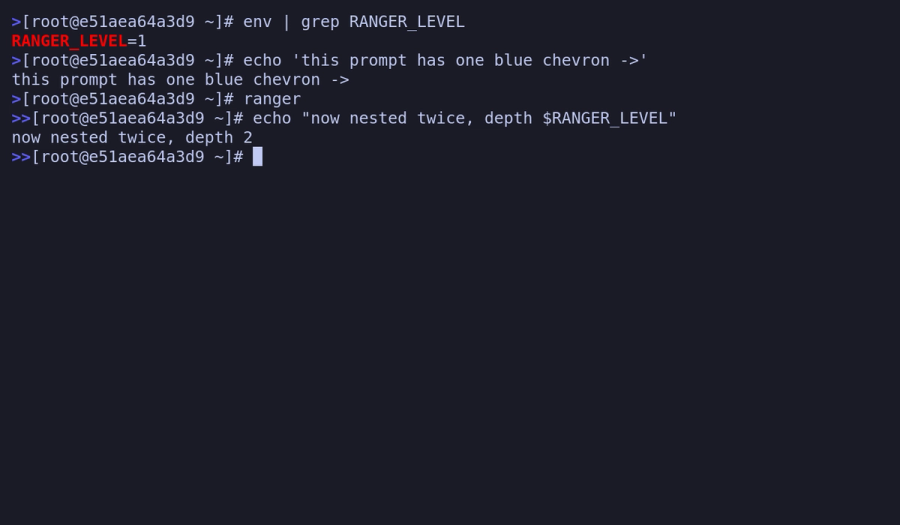
It keeps stacking for as long as you keep nesting. In practice I rarely go past two or three, but the point is that the depth is never a mystery anymore.
Screenshotting it in a throwaway Docker container
Those two screenshots were not taken on my actual machine. Getting a clean, reproducible picture of a colored terminal prompt is fiddlier than it sounds: you need a real terminal emulator rendering real ANSI colors, and you need to drive ranger's keystrokes programmatically. I did not want to clutter my own setup with any of that (uh, what Claude? A terminal emulator? Not wanting to “clutter my own setup” was not why I asked you to generate the screenshot from a Docker container 🤪 I didn’t want random terminal windows popping up while I was working on other things), so the whole thing ran inside a Docker container that deletes itself when it exits.
The container is a slim Debian with ranger, xterm (a real terminal that renders real fonts and colors), xvfb (a headless X display for the terminal to draw onto), xdotool (to send keystrokes), and imagemagick (whose import command grabs a window into a PNG). The Dockerfile is boring on purpose:
DockerfileFROM debian:bookworm-slim
RUN apt-get update && apt-get install -y --no-install-recommends \
    bash ranger xterm xvfb xdotool imagemagick \
    xfonts-base fonts-dejavu-core procps
COPY demo_bashrc /root/demo_bashrc
COPY capture.sh  /root/capture.sh
CMD ["/root/capture.sh"]
The capture script starts a virtual display, launches xterm running ranger, and then puppets it. The interesting part is that I drive real ranger nesting rather than faking the variable: xdotool presses Shift+S to spawn ranger's subshell (so ranger itself sets RANGER_LEVEL), types a command or two, and import snaps the window.
capture.sh (trimmed)export DISPLAY=:99
Xvfb :99 -screen 0 1400x900x24 &
sleep 2

# launch a real terminal running ranger, drawing onto the virtual display
xterm -fa DejaVuSansMono -fs 18 -bg '#1a1b26' -fg '#c0caf5' \
      -geometry 92x26 -T ranger-real -e ranger /root &
sleep 3

# S spawns ranger's subshell, so RANGER_LEVEL is set by ranger, not by me
xdotool search --name ranger-real windowactivate --sync
xdotool key --clearmodifiers shift+s
sleep 2
xdotool type --delay 45 "env | grep RANGER_LEVEL"; xdotool key Return

# grab just the terminal window into a PNG
id=$(xdotool search --name ranger-real | head -n1)
import -window "$id" /out/ranger-depth-1.png
To nest a second time, the script types ranger inside that shell and presses Shift+S again, then screenshots the >> prompt. The demo_bashrc it sources is a trimmed copy of my real one containing the exact ranger-levels snippet above, so the chevrons in the pictures are produced by the same six lines this article is about, not a reproduction.
Running it is a one-liner, and the --rm means nothing survives except the PNGs it drops in a mounted folder:
docker build -t ranger-demo .
docker run --rm -v "$PWD/out:/out" ranger-demo
How this article actually got here
In keeping with a habit I have picked up: I did not write most of this. My site pulls articles from sanity.io, a headless CMS with an MCP server that Claude Code can talk to directly. I pointed Claude at the ranger snippet in my ~/.bashrc and asked it to explain the code, build the Docker harness, take the screenshots, and publish the result here.
- Claude wrote the Dockerfile and the
xdotoolcapture script, ran the container, and pulled back the PNGs. The genuinely nested-ranger screenshots above are its output, not mine. - It uploaded the images to Sanity and assembled this whole page as structured content through the MCP, without me touching the Studio.
- I asked it to read my previous articles for tone and to keep the em-dashes out, because otherwise the seams show.